
%20(1).jpg)
When was the last time you read a long document top to bottom? For most people, the answer is rarely, if ever. We open it, skim the headings, search for the one section we need, and close it again. That's the challenge with a lot of information, training and resources: the format gets in the way of the message.
This is where microsites come in. A microsite is a small, standalone digital tool, built for a specific purpose, that can stand on its own or integrate seamlessly into an existing website. Instead of a static document, it's a living, interactive space that adapts to how people look for information.
We build microsites across a wide range of needs, including:
- training
- toolkits
- resource databases
- information hubs
- guides.
What they have in common is a focus on usability and accessibility. Information stays current and easy to update, content is structured so people can find exactly what they need, and the experience is engaging enough that people stick with it. Other related resources can be embedded and downloadable.
Microsites can also be built to meet the highest standards of accessibility, being flexible to people’s needs with features such as variable text size and contrast. Microsites are usually easier to navigate with screen readers than most documents, especially PDFs.
And creating a microsite is an easier option than you might think – learn more from our tips on what you need to know.
If it’s a simple document, like a report or publication, we can also easily convert into clean, accessible HTML. This brings the same benefits of usability, accessibility and interactivity, and follows best practice for information publishing.
Where microsites work most effectively
Microsites can take on almost any job that a static document used to do. But there are a few common applications that come up regularly in our work.
Training
Training content is a natural fit for an interactive format, especially when staff need to retain and apply information rather than just read it once. For the Queensland Community Support Scheme (QCSS), we built fit-for-purpose training modules to support service provision staff across Queensland. Rather than static slides or a manual, the training uses scenario-based modules that walk staff through realistic situations, from client interactions through to workflow decision points, depending on what each module needs to teach. Pop-out boxes highlight key information at the point staff need it, and knowledge check quizzes throughout confirm understanding before moving on. The result is training that staff actually engage with and enjoy learning from.
"TSD has the expertise and proficiency for co-designing with the intended audience. They supported the department through skillful engagement with mainstream and First Nations service providers to develop meaningful resource content in an adaptable format."
Toolkits
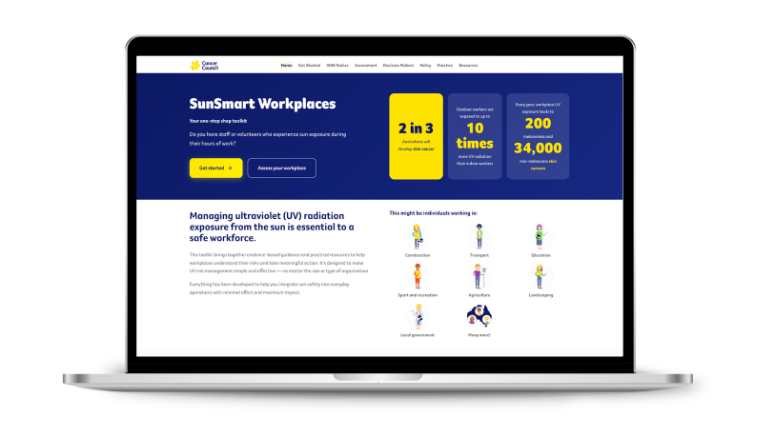
A toolkit needs to meet people wherever they are in their own process, which is hard to do in a single linear document. We worked with the Cancer Council NSW to design the SunSmart Workplaces toolkit giving Australian workplaces practical guidance on protecting outdoor workers from UV exposure. This microsite was integrated directly into the Cancer Council NSW website. Usually this is the kind of resource that would once have lived in a PDF, downloaded once and possibly not opened again. As a microsite, it guides different users (whether they're just getting started or ready to put a policy into practice) along their own path, with editable templates, assessments and downloadable resources all in one navigable space.
Resource databases and information hubs
When the goal is helping people find trustworthy information quickly, search and filtering matter more than any single page of content. The MBC Hub is the first dedicated site bringing together Australian-based information for people living with metastatic breast cancer. At its core, The Hub is a searchable database of verified resources, podcasts, websites and guides. Filters ensure people can find what's relevant to their specific needs rather than wading through everything at once. For a community that's often left searching for trustworthy information, having one place to start, written by people with lived experience, makes a real difference.
.png)
Guides
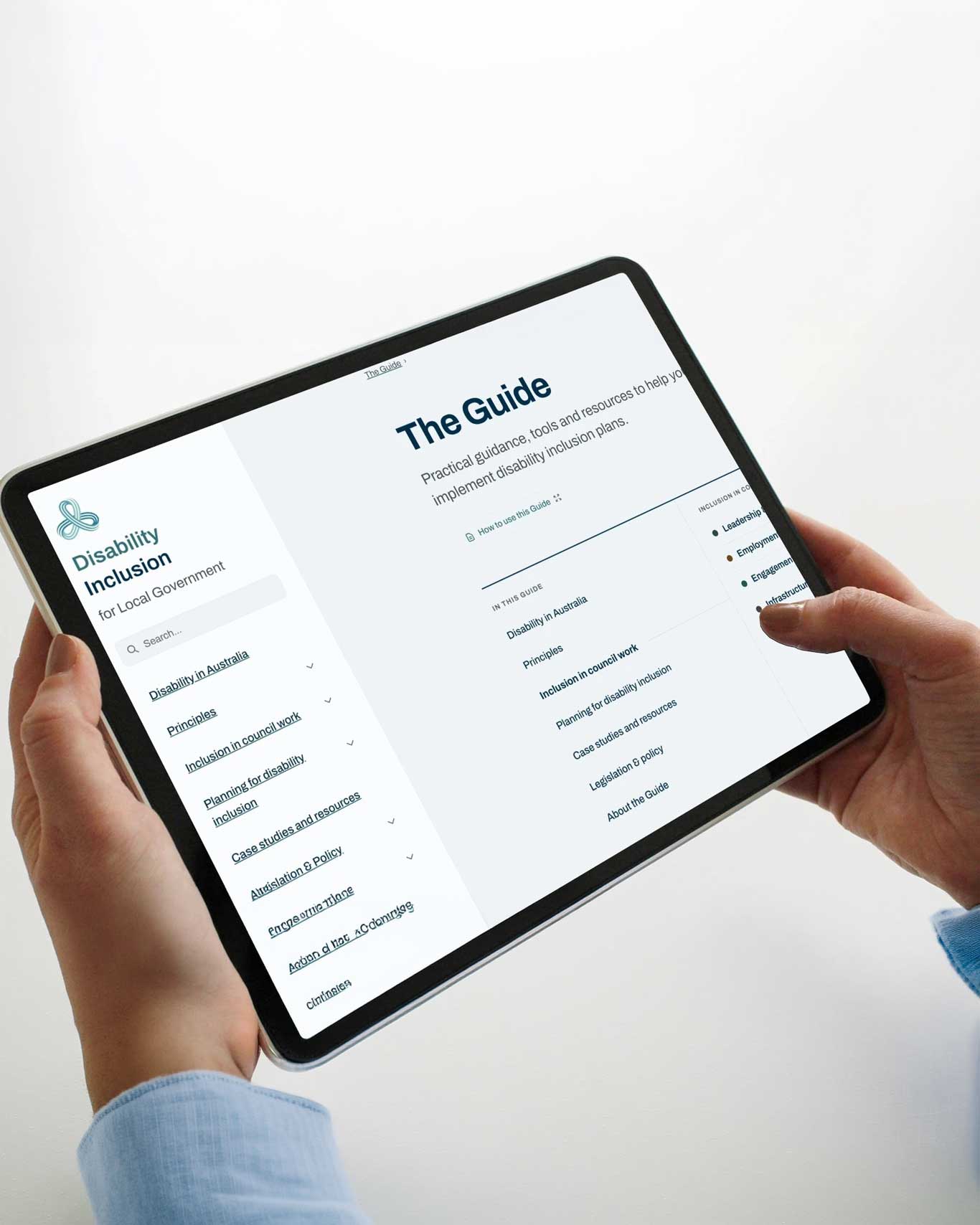
Guides often need to evolve as policy, legislation and community expectations shift, which is difficult for a document that's published once and left alone. For the Australian Local Government Association (ALGA), we supported the development of a modernised guide to disability inclusion for local councils. The original guide, published in 2016, needed to catch up with a decade of change: a national Disability Strategy, updated legislation, and the reforms flowing from the Disability Royal Commission. Built as a microsite rather than a static PDF, it can showcase real, timely case studies. From the City of Casey's Disability at Dusk event, to the City of Melville's sensory play park, this working resource allows council staff to return to and navigate the content.
"This is a fantastic guide, one of the best I have ever seen on any topic. Super useful links."
Creating a microsite
Building a good microsite isn't about throwing a PDF online and adding a search bar. It takes the same strategic thinking we bring to any communication or engagement produ
Understanding the need. Before any design or development starts, we make sure we're clear on who the site is for and what it needs to achieve. Is the goal to inform, train, or help people find the resources they need? Who is the audience, and what do they already know? This might come from a co-design or co-development process. We would work with key stakeholders and lived experience to guide the building of the product and content. What brand styles or rules do we need to follow? Where will the microsite be published? Are there any technical limitations we need to work with? Investing this time upfront means less time spent backtracking later, and a building process that's efficient and produces the highest quality result.
Establishing the hierarchy of information. We map out how content should be organised so that people can navigate intuitively, whether they're scanning for one fact or working through a full training module. This means thinking about what is most important for people to see, identifying what is optional or for some audiences only. We try to understand how people will move between sections. This is key to engaging users.
Developing the content. With structure in place, we develop the words and the design together rather than treating them as separate jobs. Plain language, clear visual hierarchy and thoughtful use of interactive elements all work together to make sure the site is genuinely useful, easy to navigate and sets the right tone in language and design.
Testing with actual users. Before a microsite goes live, we test it with the people who'll actually use it, whether that's through a reference group, recruited interviews, or another format. This is where assumptions get checked against reality and we confirm whether the site will work for its intended audience. Navigation that made sense in planning might confuse a first-time user, or content we thought was essential might be skipped entirely. Testing at this stage means we can refine the site to be confident and ready for launch.
Not every resource needs the full interactivity of a microsite. If you've got a simpler document, like a single report or publication, we also offer a separate service that converts it into clean, accessible HTML, keeping the same standards of usability and accessibility without building a standalone site.
Get in touch
Whether you've got a defined project in mind or want to explore what's possible, get in touch with our Director of Innovation and Digital and COO, Steve Speldewinde, at steve@thesocialdeck.com for a conversation about how we can help.


Read more posts
.jpg)

The tools to advocate for change
December 14, 2023
.jpeg)
Young Social Deck scholars embrace learning from home
April 20, 2020


